Supplier management – wholesale catalogues and purchase prices in one place
Import wholesale catalogues, compare prices, import the basket from the web shop: you price your quotes with real purchase prices instead of outdated lists – and see every invoice, credit note and payment per supplier at a glance.
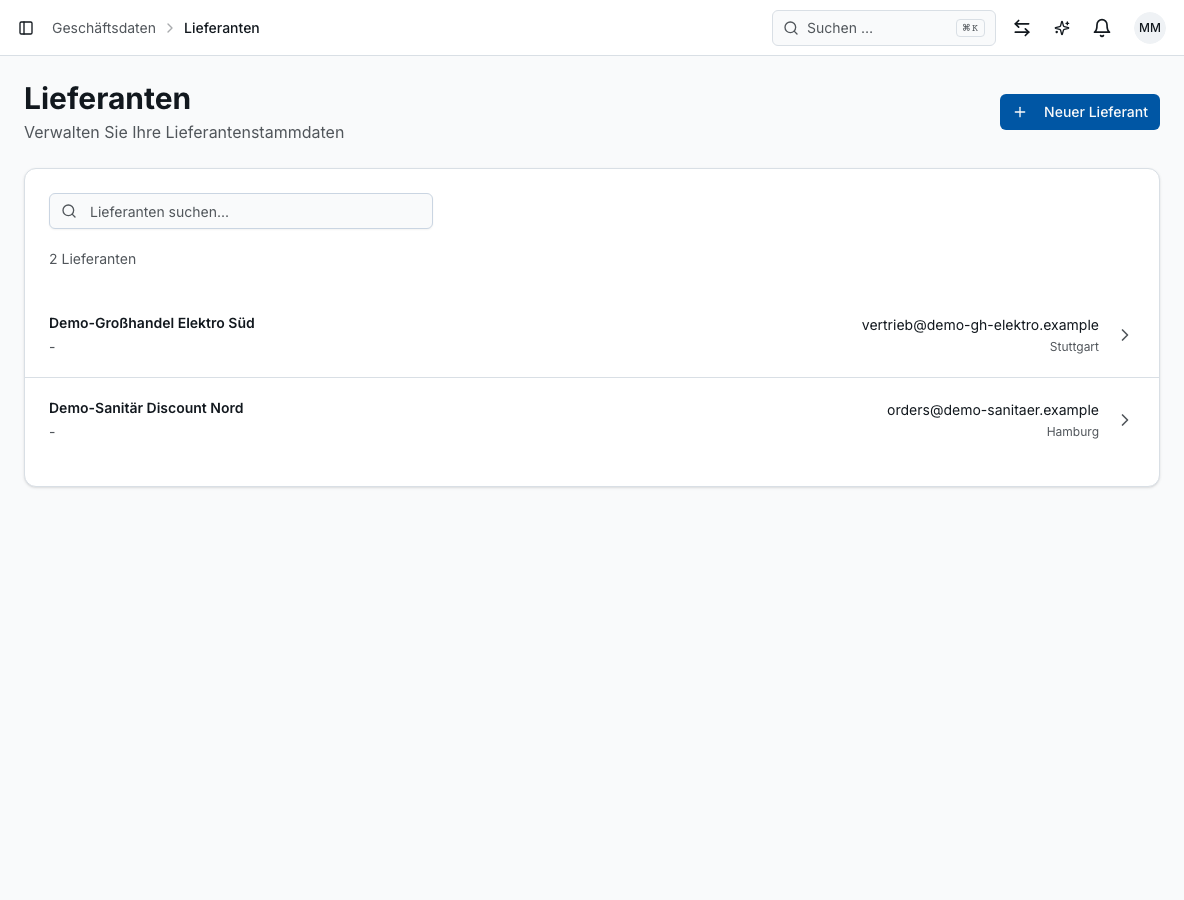
Central supplier file
All supplier data in one place: address, contact person, phone and email. That way you always have the right contact to hand – on the road too.
- Complete contact details with contact person, supplier number and bank details
- Default cost type per supplier, e.g. “Leiharbeit” (temporary workers) for the staffing agency
- Supplier type (e.g. wholesaler) for quick selection
- Notes and comments
- Quick search
Managing price lists
Store individual price lists per supplier. That way the right purchase prices are applied automatically when you price quotes – and you see straight away where you can buy more cheaply.
- Import catalogues as DATANORM (the German wholesale format), BMEcat or CSV
- Prices applied automatically in quote and calculation
- Price comparison: the same article from several suppliers side by side
- Würth: today's net prices via a direct interface, directly in the quote
Order directly in the wholesaler's web shop
Via IDS-Connect, you jump from Bleno straight into your wholesaler's web shop, put together the basket and then bring it back into Bleno with prices – without typing in item numbers. You pass on order suggestions from the warehouse as an order list – as CSV or printed.
- Jump to the web shop via IDS-Connect (including ITEK, Würth)
- Take the basket with prices back into Bleno
- Order suggestions at the reorder level, grouped by supplier
- Material linked to the central item catalogue
Invoices, credit notes & payments per supplier
All supplier invoices, delivery notes and credit notes are attached to the supplier. Bleno checks every invoice against the order confirmation and delivery note – partial invoices for the same order confirmation too. You offset credit notes against open invoices, and payment is made directly from Bleno.
- Document check: invoice against order confirmation and delivery note, partial invoices with the open remainder per order confirmation
- Offset credit notes or split them across several invoices
- Schedule a payment and pay under “Open payments” via finAPI or SEPA file
- Reminders from the supplier are recognised – all admins get a push notification and an email straight away, and Bleno reports due invoices without a direct debit every morning
Type the item number – the price is in the quote
In quotes and invoices you type the item number or EAN from your wholesaler's catalogue and press Enter. Bleno adds the item with its purchase price and puts your margin on top – no searching, no retyping. Your own items and all wholesale catalogues are in one place under “Items & catalogues”.
- Type the item number or EAN, press Enter – the line item is done
- Purchase price per unit, even if the catalogue prices per 100 m or per 1,000 pieces
- If several suppliers carry the number, the lowest purchase price is at the top
- Your own items and all wholesale catalogues in one place with one search
Benefits
Suppliers: what it does for you
- Price quotes with current purchase prices
- Import catalogues in minutes instead of typing in items
- Better purchasing terms through price comparison
- Import the web shop basket without retyping
- All invoices, credit notes and payments per supplier
- Less time spent searching
- Line items by item number instead of by hand
FAQ
Frequently asked questions
DATANORM (the German wholesale format), BMEcat (XML) and CSV. Catalogue items are then available in the quote with their purchase price and can be added directly to your item list. For Würth there is also an interface for today's net prices, and via IDS-Connect you import baskets from wholesalers' web shops.
You can store individual price lists with article numbers, names and prices for each supplier. These prices are suggested automatically in the material calculation.
Yes, you can link materials directly to suppliers. That way you always know which supplier you get which material from.
Yes. Once you have imported your wholesaler's catalogue as DATANORM (the German wholesale format), BMEcat or CSV, you type the item number or EAN in the quote or invoice and press Enter. Bleno adds the item as a line item with its purchase price and your margin. If several suppliers carry the same number, you choose – the lowest purchase price is at the top.
Matching features
These features work hand in hand in your daily work. You'll find all the others in the overview.
Materials & inventory
Item catalogue, stock with QR scanning, loading lists and material costs per project.
Learn more – Materials & inventory →Quotes & invoices
Create professional quotes, order confirmations and invoices in minutes.
Learn more – Quotes & invoices →Ready to get started?
Try Bleno free for 14 days, with no obligation. No credit card required.